Production-Ready Software: How to Turn Your Vibe-Coded AI Prototype into a Real Product
Table of Contents
Harden Your Prototype
Need senior engineers to audit, secure, and scale your AI prototype?
You vibe-coded a prototype - maybe with an AI coding assistant, maybe on a weekend, maybe with a freelancer who's since moved on. It works. People can click through it. It might even have a handful of early users already.
Then comes the question every team eventually asks: is this actually production-ready?
Usually, the honest answer is no - not yet. An AI-generated proof-of-concept and a product that's ready for production are not the same thing, even when they look identical on screen. One proves an idea works. The other has to keep working - under live traffic, unpredictable edge cases, real payments, and the occasional attacker - every single day. This guide walks through exactly what closes that gap.
Production-Ready Means
What Does "Production-Ready" Actually Mean?
A production-ready product is software that can be deployed to a live environment and reliably serve actual customers - not just the version that works on a developer's laptop.
"It runs" and "it's ready to go live" are different claims. AWS describes continuous delivery as automating the building, testing, and deployment of software into production - implying a level of process and rigor most early builds never touch. A vibe-coded prototype might demonstrate the right idea while quietly skipping the things that only matter once people start actually using it: error handling when something goes wrong, logging so you know what went wrong, authentication that can't be bypassed, secrets stored properly instead of sitting in plain text, and infrastructure that doesn't buckle the moment traffic spikes.
For teams with real uptime expectations, this also means thinking about high availability and a basic disaster recovery plan - how the system keeps running, or recovers quickly, if a server, region, or dependency goes down - rather than assuming a single instance will always be enough.
Staging vs. Production Environments
A staging environment mirrors production as closely as possible - same configuration, same infrastructure shape - but isn't customer-facing. Every meaningful change gets validated there first. If a team is deploying straight from a laptop to a live URL, that's usually the clearest sign the project isn't ready for prime time yet, regardless of how solid the code looks.
Prototype vs. Production: Understanding the Gap
Early builds and MVPs exist to answer one question fast: does this solve a real problem for real people? Production systems exist to answer a different one: can this keep solving that problem reliably, for as many people as show up, indefinitely?
That difference in purpose shows up directly in the code. AI coding tools in particular are optimized to produce something that looks finished fast - but as Builder.io's analysis of AI-generated code points out, that output frequently lacks the security, observability, and integration depth production systems need. None of that is necessarily a mistake by the tool or the developer - it's the right trade-off for validating an idea quickly. The mistake is assuming that trade-off disappears on its own once the concept is proven.
When an Early Build Isn't Enough
Speed and robustness pull in opposite directions, and a prototype - vibe-coded or otherwise - is put together to optimize for the former. That's fine right up until paying customers, live data, or real transactions are involved, at which point the shortcuts that make it fast to assemble become the exact things that make it fragile once it matters.
MVP vs. Production: Different Goals
An is scoped around the minimum feature set needed to validate demand. A production system is scoped around stability, security, and the ability to grow - feature completeness is almost beside the point. Teams that treat these as the same milestone tend to launch something that impresses in a demo and buckles under its first real growth spurt.
Signs Your App Isn't Ready to Go Live
- •It crashes or behaves unpredictably under moderate load
- •There's no automated test suite - changes get verified by clicking around manually
- •Configuration and secrets sit hard-coded directly in the source
- •Releases are manual, undocumented, and depend on one person knowing the steps
- •There's no logging or monitoring, so failures get discovered by customers, not the team
Common Pitfalls in Releasing Unhardened Code
Shipping code before it's hardened doesn't usually fail immediately - it fails later, at the worst possible moment.
Scalability and Performance Issues
Code that was never load-tested tends to hold up fine right up until it doesn't. Without simulating real-world traffic ahead of time, the first genuine stress test a system gets is often a live traffic spike - the most expensive possible moment to discover a bottleneck.
Security and Compliance Gaps
Missing authentication checks, unencrypted data, and unvalidated input are common in code written to prove a concept rather than withstand an attack. The OWASP Top 10 is the standard reference for vulnerabilities - and most vibe-coded prototypes haven't been checked against any of them.
Lack of Testing and Automation
Manual releases and an absent test suite mean every change is a small gamble. Without automated checks running on every commit, regressions get caught by customers in production instead of by a pipeline before anything ships.
Accumulating Technical Debt
Rushed logic, duplicated code, and shortcuts taken under deadline pressure compound over time. Left alone, technical debt doesn't stay flat - it makes every future feature slower and riskier to deliver.
If your prototype already has users but lacks testing, deployment automation, or scalable architecture, this is typically the stage where an experienced engineering team can help harden the product before launch - whether that's a web app, a mobile app, or an AI-integrated product. See , , or depending on where your product sits.
Key Steps to Make Your Code Production-Ready
Turning an early build - vibe-coded or otherwise - into a live, dependable product follows a fairly consistent sequence, whether the underlying stack is a web app, a mobile app, or an AI-enabled product.
1Perform a Code Audit
One of the first things worth evaluating is the existing codebase itself - structure, security, and overall quality - using linters and static analysis tools to surface obvious issues, then a manual pass to understand what's actually there before deciding what to keep. Good dependency management matters here too: outdated or unnecessary third-party packages are a common source of both security risk and future maintenance headaches. This step counts even more for AI-generated code, which can look clean while hiding structural shortcuts.
2Refactor for Maintainability
Business logic needs to be separated from UI, hard-coded values removed, and patterns that were fine for a fast prototype cleaned up before they become a liability as the product grows. This is also where the decision between refactoring existing code and rebuilding a component from scratch usually gets made.
3Architect for Scale
Rather than designing for what the product needed to handle during testing, the architecture and data model should reflect what it actually needs to handle at scale. This is usually where a proper schema migration process replaces manual database edits, where caching gets introduced to reduce repeated load on the database, and where rate limiting gets added so a single user or bot can't accidentally take the whole system down.
4Set Up a CI/CD Pipeline
Automating the path from commit to release means every change follows the same reliable process instead of a manual, one-off routine. More on this below.
5Automate Testing
Unit, integration, and end-to-end tests belong in place early, so regressions get caught before they reach customers, not after.
6Prepare Environments
Development, staging, and production configurations need to stay separate, with secrets managed properly rather than embedded in code - typically using containerization (see Docker's documentation) to keep all three environments consistent.
7Document the System
The README, API documentation, and deployment runbooks all need updating so the system doesn't depend on one person's memory to operate or maintain.
8Plan the Go-Live
A rollout plan, a rollback path, and a clear view of what gets watched in the first hours and days after release round out this stage.
Teams without in-house DevOps, QA, or security depth often bring in additional engineers for exactly this phase - see our if that's the gap you're facing. Agencies managing this transition on behalf of a client can also explore .
Building a CI/CD Pipeline for Production
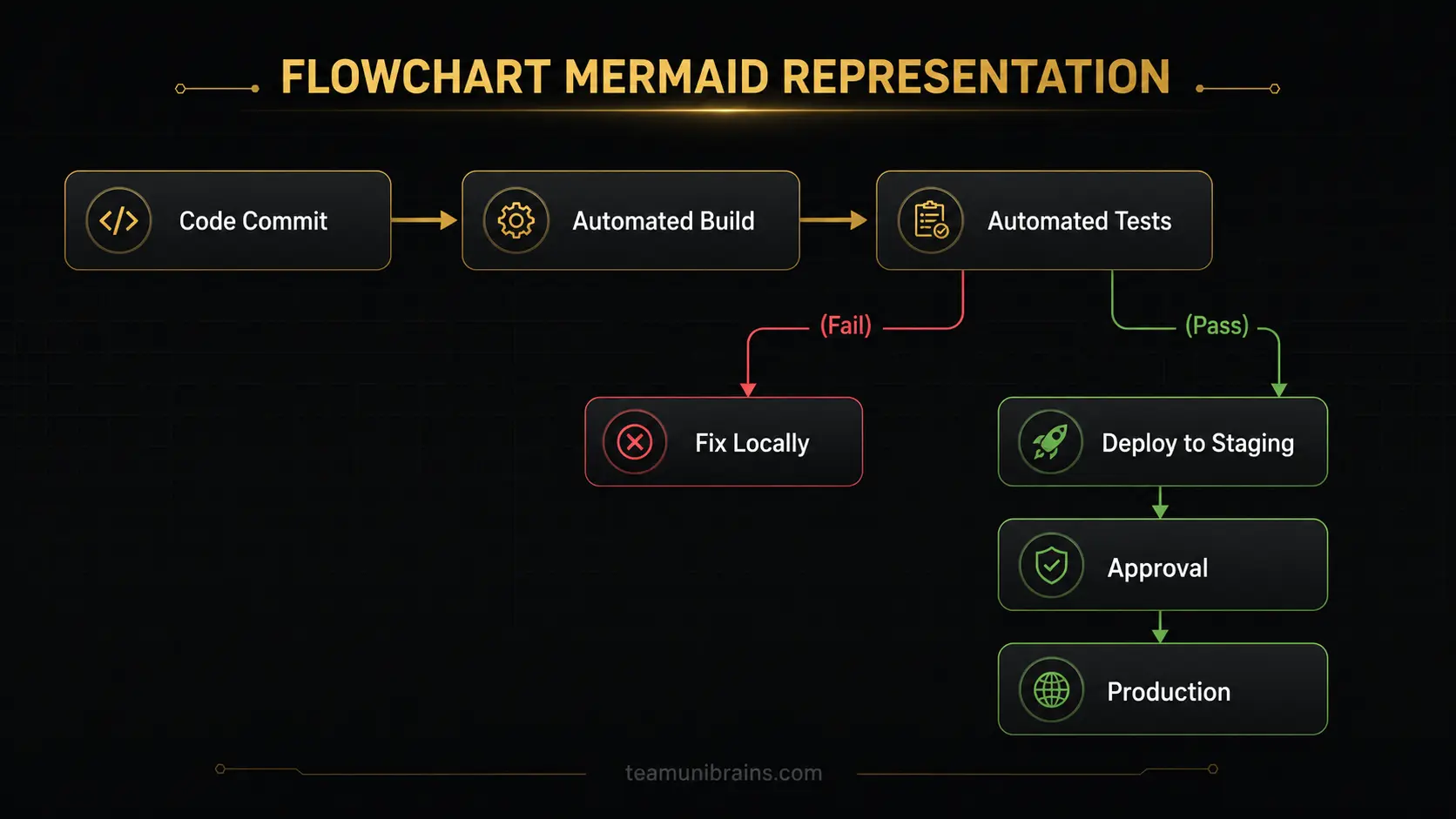
CI/CD (continuous integration and continuous delivery/deployment) is the automated process that carries a code commit from build, through testing, to a live release - without a person manually repeating those steps every time.
Automated Builds and Tests
Every commit should automatically trigger a build and a test run - via tools like GitHub Actions - so problems surface within minutes rather than at the next manual release.
Continuous Delivery vs. Continuous Deployment
Continuous delivery automates everything up to a final, manual go-ahead to release. Continuous deployment goes one step further and pushes changes live automatically once they pass every check. Most teams start with delivery and move to full deployment once confidence in the pipeline is high.
Using Containers and Infrastructure as Code
Containerization (commonly Docker and Kubernetes) keeps development, staging, and production environments consistent. Infrastructure as code - using tools like Terraform - makes infrastructure changes repeatable and reviewable rather than manual.
Deployment Strategies
Blue-green deployment runs the new version alongside the old one and switches traffic over once it's verified. Canary deployment rolls a new release out to a small percentage of users first, catching problems before they affect everyone. Both are common ways to achieve zero-downtime deployment - shipping updates without taking the product offline - and both depend on health checks that confirm a new version is actually working before it receives live traffic.
Feature flags are a related tool worth mentioning here: they let a team push code to production in a switched-off state and turn it on gradually, which makes rolling back a single feature far less risky than rolling back an entire release.
Ensuring Quality and Security in Production
Testing and monitoring aren't a phase that ends at go-live - they're what keeps a system trustworthy over time.
Automated Testing Frameworks
Unit tests validate individual pieces of logic; integration tests confirm those pieces work together; end-to-end tests verify the full user flow. A quick smoke test after each deployment - checking that the core paths still work - and periodic regression testing as the codebase grows both help catch the same class of problem before customers do: something that used to work quietly breaking.
Performance and Load Testing
Simulating real-world traffic before go-live, rather than after a spike causes an outage, is one of the more reliably skipped steps in prototype code - and one of the most expensive to skip.
Security Audits and Hardening
Static and dynamic security analysis, checking against known vulnerability classes like the OWASP Top 10, encryption in transit and at rest, and proper secrets management all belong here - ideally addressed early, not bolted on right before release.
Monitoring, Logging, and Alerts
Observability - the ability to understand what's happening inside a running system from its outputs, like logs and metrics - is what turns "the app is down" from a customer complaint into something the team already knows about and is fixing.
Deployment and Maintenance: Launching Your Product
Go-live day isn't the finish line - it's the point where real operational discipline starts to matter.
Launch Preparation
A final smoke test in staging, confirmed backups, and clarity on who's responsible for what if something goes wrong in the first hours after release - these three things separate a controlled launch from a stressful one.
Monitoring After Go-Live
Uptime, error rates, and key performance indicators deserve close attention in the period right after release, when unexpected issues are most likely to surface.
Scaling and Maintenance
Growth needs planning from day one - auto-scaling where it makes sense - and the product itself should be treated as something that keeps evolving through ongoing fixes and improvements, not something that's "finished" once it ships.
1. Idea & Planning
Define the problem, users, and success criteria
2. Prototype / MVP
Validate the idea with real users
3. Hardening
Code audit, refactor, architecture, security
4. CI/CD & Testing
Automate build, test, and deployment
5. Deployment
Launch with monitoring and rollback plan
6. Maintenance
Ongoing fixes, scaling, and iteration
Production Readiness Checklist
Before going live, confirm each of these is actually in place - not just planned:
Verification Criteria (15/15 Passed)
Partnering for Production Success
Getting a vibe-coded prototype ready for real customers is a well-defined process - but it's also where a lot of teams underestimate the effort, timeline, or specialist skills involved. TeamUnibrains works with startups, SaaS teams, and agencies across the US, EU, UK, Asia, and the Middle East on exactly this transition - including a B2B jewellery supplier platform that started as a focused MVP and now serves more than 2,000 active store owners as paying customers, built on the same principles of clean architecture and disciplined engineering outlined above. [Note: add project duration, tech stack, and any measurable improvements - e.g. deployment frequency, uptime - once available, to strengthen this proof point further.]
Whatever stage your project is at - an early build that needs hardening, a web or mobile app that needs to scale, an AI feature that needs proper integration, or a team that needs extra engineering hands to get there faster - we can help. Explore our , , , , , or services, or schedule a discovery call to talk through where your product stands right now.
Frequently Asked Questions
It means the application can serve real customers reliably - tested, secured, monitored, and deployed in an environment built to scale, not just a setup that works for a demo.
Turn Your AI Prototype into a Secure, Scalable Product
Schedule a technical discovery session with our senior engineers to audit your code, establish CI/CD, and get production-ready.